Best Project Management Software for Small Business in 2026 (Top 9 Picks Compared)
Running a small business means wearing a dozen hats at once — and somewhere in between sales calls, client emails, and putting out fires, someone still has to make sure projects actually get finished on time. That’s where project management software earns its keep. The right tool turns scattered spreadsheets, sticky notes, and “did anyone follow up on this?” Slack messages into one organized system everyone can see.
The challenge is that the project management market is enormous, and most of it is built for enterprise teams with dedicated IT departments and six-figure software budgets — not a 12-person marketing agency or a 5-person home services business. In 2026, the good news is that small businesses have more genuinely good, affordable options than ever, from visual board-based tools to AI-assisted work platforms.
This guide breaks down the best project management software for small business in 2026, what each tool does well, who it’s actually built for, and how much it costs — so you can pick a platform that fits your team instead of fighting it.
What to Look for in Project Management Software for Small Business
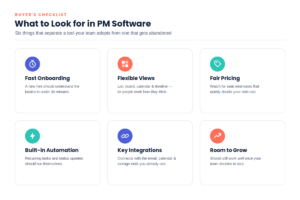
Before comparing tools, it helps to know which features actually matter at small-business scale. Here’s what separates a tool that gets adopted from one that gets abandoned after two weeks:
- Fast onboarding. Small teams don’t have time for a multi-week rollout. If a new hire can’t understand the basics in under 30 minutes, the tool is too complex for a lean team.
- Flexible views. Some people think in lists, others in calendars, others in visual boards. Software that offers list, board (Kanban), calendar, and timeline/Gantt views lets each person work the way they think.
- Honest pricing at low headcounts. Many platforms enforce minimum seat counts (often 3 to 10 users) even if you only need two or three logins. Watch for this — it can quietly double your real cost.
- Built-in automation. Recurring tasks, status updates, and reminders should run themselves. Automation is what keeps a 5-person team from needing a full-time project coordinator.
- Integrations with tools you already use. Email, calendar, file storage, and accounting software integrations save hours of manual data entry every week.
- Room to grow. The tool you pick at 5 employees should still work reasonably well at 25, so you’re not migrating platforms (and re-training everyone) a year later.
- Real customer support. Small businesses rarely have an internal “power user” to troubleshoot problems, so responsive support and good documentation matter more than they would at a large company.
With those criteria in mind, here are the platforms that consistently stand out for small business use in 2026.
The 9 Best Project Management Tools for Small Business in 2026
1. monday.com — Best Overall for Small Business
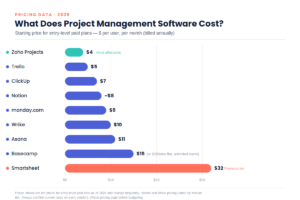
monday.com is built around colorful, highly visual boards that are easy to customize without any technical skill. It’s a strong all-around pick because it balances simplicity with real depth — you can start with basic task tracking and grow into dashboards, automations, and AI-assisted workflows as your team matures. The free plan supports a small number of boards, and paid plans require a minimum of three seats, which is worth factoring in if your team is very small. Pricing typically starts around $9 per user, per month on the entry paid tier, climbing to roughly $12–$19 per user for mid-tier plans with deeper automation and reporting. monday.com is best for visual teams that want flexibility and don’t mind paying a modest per-seat premium for polish and integrations.
2. ClickUp — Best Value, All-in-One Platform
ClickUp’s pitch is simple: replace your project management tool, your docs app, your time tracker, and your goal-tracking spreadsheet with one platform. Its free plan is one of the most generous in the category, supporting unlimited members and tasks with reasonable storage limits. Paid plans start around $7 per user, per month on the Unlimited tier, rising to about $12 per user on Business plans billed annually — consistently undercutting Asana and monday.com at comparable feature levels. The tradeoff is a steeper learning curve; ClickUp’s sheer number of customization options can overwhelm a brand-new team. It’s the right call for small businesses that want to consolidate several tools into one and are willing to spend a couple of weeks on initial setup.
3. Asana — Best for Ease of Use
Asana remains one of the cleanest, most intuitive project management tools available, which is exactly why so many small teams gravitate toward it. Tasks, projects, and timelines are easy to set up, and the interface stays uncluttered even as project complexity grows. Asana’s free Personal plan now caps out at a small number of users, so most small teams will land on the Starter plan, priced around $11 per user, per month billed annually (closer to $13 billed monthly). The Advanced tier, aimed at businesses that need portfolio views, goal tracking, and workload management, runs roughly $25 per user, per month annually. Asana is best for teams that prioritize a short learning curve and a polished day-to-day experience over maximum customization.
4. Trello — Best for Simple Kanban Workflows
If your team’s main need is a visual to-do board — not Gantt charts, not resource forecasting, just clear visibility into what’s being worked on — Trello is hard to beat. Its card-and-list Kanban format is genuinely intuitive, even for non-technical teams, and the free plan (up to ten members) is enough for many very small businesses. Paid plans start around $5 per user, per month for the Standard tier, with a Premium tier near $10 per user, per month that unlocks calendar, timeline, and dashboard views. Trello’s simplicity is also its ceiling: teams with complex, interdependent projects, or anyone needing built-in resource management, will likely outgrow it. It’s best suited to small teams managing straightforward workflows who’d rather not deal with a steep setup process.
5. Zoho Projects — Best Budget-Friendly Option
Zoho Projects rarely tops “best overall” lists, but it consistently wins on value for cost-conscious small businesses, especially those already using other Zoho apps like Zoho CRM or Zoho Books. Paid plans start at roughly $4–$5 per user, per month for the Premium tier and around $9–$10 per user for the Enterprise tier — both notably cheaper than comparable plans from Asana, monday.com, or Wrike. Features include Gantt charts, time tracking, issue tracking, and built-in chat, which is more collaboration functionality than most budget tools offer. The interface isn’t as polished as Asana’s, and the learning curve is a bit steeper, but for a small business watching every dollar, Zoho Projects delivers a lot of functionality per seat.
6. Smartsheet — Best for Spreadsheet-Style Project Tracking
For teams that already think in rows and columns, Smartsheet offers project management built around a familiar spreadsheet interface, layered with Gantt charts, automation, dashboards, and real-time collaboration. It’s a great fit for operations-heavy small businesses — think construction, logistics, or professional services firms — that need detailed tracking without abandoning the spreadsheet mental model entirely. Smartsheet’s Business tier runs around $32 per user, per month, noticeably pricier than most tools on this list, and some users report a learning curve for its more advanced features. It’s best for small businesses with data-heavy projects who are willing to pay a premium for that spreadsheet-meets-PM-tool flexibility.
7. Wrike — Best for Resource Management
Wrike leans enterprise, but its resource management and workload visibility tools are strong enough that growing small businesses — particularly creative agencies and professional services firms — often adopt it earlier than expected. Wrike’s free plan is genuinely usable for small teams, and paid plans start around $10 per user, per month for the Team tier, jumping to roughly $25 per user for the Business tier that unlocks custom workflows, advanced reporting, and capacity planning. Wrike integrates well with Adobe Creative Cloud and Salesforce, making it a particularly good fit for agencies managing client creative work or sales-linked projects. The pricing jump between tiers is steep, so it’s best for small businesses that specifically need resource planning and are prepared to pay for it.
8. Notion — Best for Docs + Lightweight Project Tracking
Notion isn’t a dedicated project management tool — it’s a flexible workspace combining notes, wikis, and databases — but its lightweight task and project tracking features are good enough that many small teams use it as their primary PM tool, especially when documentation matters as much as task tracking. The free plan is genuinely functional for individuals and very small teams, and paid plans typically run in the high single digits to around $20 per user, per month for business-tier features like advanced permissions and analytics. Notion’s flexibility is double-edged: teams that don’t set clear conventions for how pages and databases are organized can end up with a disorganized workspace over time. It’s best for small businesses that want one place for both documentation and project tracking, rather than two separate tools.
9. Basecamp — Best Flat-Rate Pricing for Growing Teams
Basecamp takes a deliberately different approach to pricing and philosophy: instead of charging per user, its Pro Unlimited plan costs a flat fee — currently around $299 per month billed annually (or $349 month-to-month) — for unlimited users, projects, and 5TB of storage. For a small business expecting to add headcount, that flat rate can be a real budget advantage once you cross roughly 15–20 users. Smaller teams can instead use the per-user Plus plan, priced around $15 per user, per month. Basecamp intentionally keeps its feature set simple — message boards, to-do lists, schedules, and file storage — and skips advanced features like Gantt charts, task dependencies, or detailed reporting. It’s best for small businesses that value simplicity, predictable costs, and free guest access for clients and contractors over deep customization.
Quick Comparison Table
| Tool | Best For | Free Plan | Starting Paid Price (per user/month, annual billing) |
|---|---|---|---|
| monday.com | Overall flexibility | Limited boards | ~$9 |
| ClickUp | All-in-one value | Generous, unlimited members | ~$7 |
| Asana | Ease of use | Small teams only | ~$11 |
| Trello | Simple Kanban boards | Up to 10 members | ~$5 |
| Zoho Projects | Budget-conscious teams | Yes, limited | ~$4–$5 |
| Smartsheet | Spreadsheet-style tracking | Limited trial | ~$32 |
| Wrike | Resource management | Usable free tier | ~$10 |
| Notion | Docs + light PM | Functional free tier | High single digits |
| Basecamp | Flat-rate, growing teams | Very limited | $15/user or $299 flat |
Pricing changes frequently and varies by promotion, billing cycle, and negotiated discounts — always confirm current rates on the vendor’s official pricing page before committing.
How Much Does Project Management Software Actually Cost?
For a small team, here’s roughly what to expect in the real world. A 10-person team on an entry-level paid plan typically pays somewhere between $50 and $200 per month, depending on the tool and tier. Once you add advanced features like portfolio reporting, advanced automation, or resource management, that figure can climb toward $250–$500 per month for the same headcount. Flat-rate tools like Basecamp break this pattern entirely, which is worth modeling out if your team is growing quickly.
A few cost traps to watch for: seat minimums that force you to pay for users you don’t have, AI features sold as costly add-ons rather than included in the base price, automation caps that force an upgrade once your workflows scale, and storage limits that quietly trigger overage charges. Reading the fine print on a pricing page — not just the headline number — will save real money over a year of use.
How to Choose the Right Tool for Your Small Business
Start by being honest about your team’s actual workflow rather than the workflow you wish you had. A five-person creative studio juggling client feedback rounds has very different needs than a ten-person operations team tracking inventory and logistics. If your team mostly needs visibility into “who’s doing what by when,” a simpler board-based tool like Trello or monday.com will likely get adopted faster than a feature-dense platform. If you’re managing complex, interdependent projects with deadlines that ripple across departments, a deeper tool like ClickUp, Wrike, or Smartsheet earns its higher price tag.
Budget matters too, but total cost of ownership is more important than the sticker price. A cheap tool nobody uses costs more than an expensive one your whole team adopts on day one. Whenever possible, run a free trial with your actual team and real projects — not a demo project — before committing to an annual contract. And build in room to grow: switching project management tools later means re-training your entire team, migrating historical data, and re-building every workflow from scratch, so it pays to choose a platform that can scale with you for at least the next two to three years.
Frequently Asked Questions
What is the best free project management software for small business? ClickUp and Trello both offer genuinely usable free plans for small teams, while Asana and monday.com offer more limited free tiers that work best for very small groups or solo users testing the platform.
How much should a small business expect to pay for project management software? Most small teams land between $5 and $15 per user, per month on a mid-tier plan, though enterprise-style platforms like Smartsheet or Wrike’s higher tiers can run $25–$35 per user.
Is project management software worth it for a team of five or fewer? Often yes, even at small scale — the time saved on status meetings, missed deadlines, and scattered communication usually outweighs the monthly cost, especially with tools that offer affordable or free plans for small teams.
What’s the easiest project management tool to learn? Trello and Asana are generally considered the easiest to onboard a new team onto, thanks to simple, visual interfaces that don’t require extensive setup or training.
Should a small business choose an all-in-one platform or a dedicated PM tool? It depends on how many separate tools you’re currently using. If you’re paying for project management, docs, and time tracking separately, an all-in-one platform like ClickUp or Notion can simplify your software stack and reduce total cost. If you only need task tracking, a dedicated tool tends to be simpler to use well.
Final Verdict
There’s no single “best” project management software for every small business — the right choice depends on team size, budget, and how complex your projects really are. For most small teams getting started, monday.com or ClickUp offer the best mix of usability and room to grow. Teams on a tight budget should look closely at Zoho Projects or Trello’s free and entry-level tiers, while agencies managing a lot of client work may find more long-term value in Wrike or Basecamp’s flat-rate model. Whichever tool you choose, start with a free trial, involve your team in the decision, and prioritize a platform people will actually use over one with the longest feature list.