Free Accounting Software for Startups in the USA: 7 Best Options for 2026

Every startup founder hits the same wall eventually: a shoebox of receipts, a half-updated spreadsheet, and a creeping suspicion that “I’ll sort the books out later” is not a real financial strategy. The good news is that you don’t need to pay for expensive accounting software to fix this. Several genuinely capable tools let US startups track income, send invoices, and stay tax-ready without spending a dollar — at least in the early stages.
The catch is that “free” in accounting software rarely means “free forever, no limits.” Revenue caps, user limits, and feature paywalls are common, and at least one major player changed its free plan significantly in 2026. Picking the wrong one isn’t just an inconvenience, either — migrating a year of transaction history between platforms is genuinely painful, so it pays to choose carefully the first time rather than switching twice.
This guide breaks down the best free accounting software for startups in the USA, what each tool actually includes at no cost, where the limits kick in, and how to choose the right one for where your business is today.
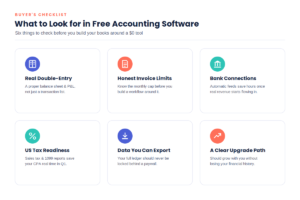
What to Look for in Free Accounting Software
Not all “free” accounting tools are built the same way, and the difference usually shows up the moment your business gets slightly more complex. Before picking a tool, check it against these criteria:
- Real double-entry accounting. Look for software that produces a proper balance sheet and profit-and-loss statement, not just a list of transactions. This matters the moment you talk to an investor, a lender, or a CPA.
- Honest invoicing limits. Some free plans cap you at a set number of invoices or clients per month. Know the ceiling before you build your workflow around it.
- Bank connection support. Manually uploading CSV files works for very low transaction volume, but automatic bank feeds save hours once you’re processing real revenue and expenses.
- US tax readiness. Sales tax tracking, 1099 contractor reporting, and clean year-end reports save your accountant (and you) a lot of pain in Q1.
- A clear upgrade path. The best free tools let you grow into a paid plan without re-entering years of financial history. Avoid anything that locks your own data behind a paywall.
- Data export and ownership. You should always be able to export your full ledger, even on a free plan. If a tool restricts data export to paid users only, treat that as a red flag.
- Support resources. Free plans rarely include phone support, but check whether you at least get email support, a help center, or active community forums for when something breaks.
The 7 Best Free Accounting Tools for US Startups in 2026

1. Wave — Best All-Around Free Starter Plan (With a Caveat)
Wave has long been the default answer to “what’s the best free accounting software,” and its Starter plan is still genuinely free: unlimited invoicing, manual income and expense tracking, and core financial reports, with no credit card required and no time limit. It’s a strong fit for a solo founder or pre-revenue startup that just needs to look professional and keep clean records.
The important update for 2026: Wave restructured its free tier mid-year. Automatic bank-feed transaction imports, OCR receipt scanning, and multi-user collaborator access (so your bookkeeper or co-founder can log in directly) now require the paid Pro plan, priced around $19 per month. On the free Starter plan, you’ll need to import bank transactions manually via CSV rather than have them sync automatically. For a single founder doing manual bookkeeping, Wave Starter is still a solid $0 option — just don’t expect the fully automated experience some older reviews describe.
2. Zoho Books — Best Free Plan for Qualifying Small Revenue
Zoho Books offers one of the most fully-featured free tiers in the category, but it comes with a specific condition: it’s free for businesses with under $50,000 in annual revenue. Below that threshold, you get real double-entry accounting, automatic bank feed reconciliation, a client portal, and up to 1,000 invoices per year, for one user plus one accountant seat.
This makes Zoho Books an excellent choice for a pre-revenue or early-revenue startup, particularly one that may eventually use other Zoho apps like Zoho CRM or Zoho Inventory, since everything shares the same ecosystem. The trade-offs: once you cross the $50K revenue mark, you’re moved to a paid plan starting around $20 per month (or about $15 per month billed annually), and US payroll integration is limited compared to QuickBooks. Still, for an early-stage founder watching the calendar until revenue picks up, it’s hard to beat.
3. ZipBooks — Best for Simple Invoicing and Freelance-Style Startups
ZipBooks takes a deliberately minimal approach: a free-forever plan with unlimited invoicing, basic bookkeeping, and time tracking, aimed at freelancers, consultants, and very small startups that don’t need deep accounting complexity. The interface is clean and easy to learn even with zero accounting background.
The limitations show up around reporting depth and data portability — some more advanced reports and full data export are reserved for paid tiers, so it’s worth checking that this won’t block you later. ZipBooks works best as a starting point for a one- or two-person startup that mainly needs to invoice clients and track basic cash flow, rather than a company anticipating complex bookkeeping needs in year one.
4. Akaunting — Best Open-Source Option for Global or Technical Founders
Akaunting is a genuinely free, open-source accounting platform, available either self-hosted on your own server or through Akaunting’s cloud version. Because it’s community-funded rather than investor-funded, there’s no revenue cap or hidden feature paywall driving a future upgrade push — though optional paid apps and add-ons exist within its marketplace.
It supports multiple currencies and dozens of languages, which makes it a strong choice for startups with international contractors, co-founders, or customers. The self-hosted option also appeals to founders who want full control over where their financial data lives. The trade-off is setup: getting the most out of Akaunting, especially self-hosted, benefits from some technical comfort, and it lacks the polish and big-name integrations of more commercial tools.
5. GnuCash — Best Free Desktop Software for Technical Founders
GnuCash is free, open-source, double-entry accounting software that’s been actively maintained for decades, and it remains one of the most capable no-cost options for founders comfortable with a more traditional desktop tool. It supports proper accrual and cash-basis accounting, multiple accounts, invoicing, and detailed financial reports, all running locally on your computer rather than in the cloud.
It’s best suited to a technically-minded founder who wants full ownership of their data with zero recurring cost and doesn’t need real-time collaboration with a remote bookkeeper. The downsides: there’s no native cloud sync, no built-in payment processing, and the interface looks and feels dated compared to modern cloud tools — there’s a real learning curve if you’ve never used desktop accounting software before.
6. Manager.io — Best Free Desktop Option for Full Bookkeeping Features
Manager’s free Desktop Edition is a genuinely complete, no-catch accounting tool: general ledger, invoicing, accounts receivable and payable, expense tracking, and reporting, all included at no cost, with versions for Windows, macOS, and Linux. There’s no credit card requirement, no trial period, and no feature paywall on the core desktop product.
The free Desktop Edition is limited to a single user per installation, though data files can be shared manually between team members if needed. For a founder who wants serious bookkeeping functionality without monthly software costs, and who doesn’t need real-time cloud collaboration, Manager.io is one of the most complete free tools available. Cloud and server editions exist for businesses that outgrow the single-user desktop model, at additional cost.
7. Odoo Accounting (Community Edition) — Best Free Option If You’ll Need an ERP Eventually
Odoo Community is the free, open-source edition of the broader Odoo business platform, released under the LGPL v3 license. Out of the box, it includes an Invoicing app that covers core bookkeeping, and additional free community modules can unlock fuller double-entry accounting features. Because Odoo also offers CRM, inventory, project management, and e-commerce modules under the same free umbrella, it’s worth a look for a startup that expects to need more than just accounting software down the line.
The honest caveat: Odoo Community requires real technical setup — typically self-hosting on your own server — and its most polished accounting automation (bank synchronization, advanced reporting, AI features) lives in the paid Enterprise edition. This makes it best for technically capable founders or startups with an engineer on the team, not someone looking for a five-minute signup.
Quick Comparison Table
| Tool | Best For | Free Plan Limit | Cloud or Desktop |
|---|---|---|---|
| Wave | All-around free starter | No automatic bank feeds or multi-user (Pro only) | Cloud |
| Zoho Books | Qualifying small revenue | Free only under $50K/year revenue | Cloud |
| ZipBooks | Simple invoicing | Limited reporting & data export | Cloud |
| Akaunting | Open-source / global founders | Setup effort for self-hosting | Cloud or self-hosted |
| GnuCash | Technical, no-cloud founders | No cloud sync, dated interface | Desktop |
| Manager.io | Full desktop bookkeeping | Single user per install | Desktop |
| Odoo Community | Future ERP needs | Requires technical setup | Self-hosted |
The Reality Check: What “Free” Actually Means

It’s worth being direct about something most “best free software” articles gloss over: free accounting tools make money somewhere, and understanding that business model helps you predict where the limits will appear. Wave earns revenue through payment processing fees and its Pro subscription. Zoho Books is a low-cost on-ramp into the wider (paid) Zoho ecosystem. ZipBooks expects you to eventually need its paid reporting tier. Open-source tools like Akaunting, GnuCash, and Odoo Community are free because there’s no company behind them extracting subscription revenue — but you pay in setup time, hosting costs, or a steeper learning curve instead.
None of this means these tools aren’t worth using — most startups genuinely can run on $0 in software costs for the first year or two. It just means you should read the fine print on revenue caps, user limits, and which specific features sit behind a paywall before you build months of financial history into a tool that turns out not to fit.
Why Not Just Use a Spreadsheet?
It’s tempting, especially pre-revenue, to track everything in Google Sheets and skip software entirely. For the first few transactions, that’s fine. The problem shows up as you scale: spreadsheets don’t enforce double-entry accounting, so a single typo or copy-paste error can throw off your entire financial picture without any warning. There’s no automatic bank reconciliation, no audit trail showing who changed what, and generating a real profit-and-loss statement or balance sheet means rebuilding formulas by hand every time.
None of the tools in this guide cost more than a spreadsheet (they’re free), but they all enforce basic accounting structure, catch errors automatically, and produce investor- or lender-ready reports in a few clicks. If you’re already comfortable in spreadsheets, the jump to something like Wave or ZipBooks takes an afternoon, and it’s an afternoon that usually pays for itself the first time you need clean books in a hurry — for a loan application, a tax filing, or a fundraising conversation.
When to Move From Free to Paid Accounting Software
Most startups outgrow free accounting software for one of three reasons: revenue crosses a plan’s free threshold, the team needs more than one person with real-time access to the books, or the business needs something free tools don’t handle well, like multi-currency consolidation, inventory accounting, or built-in US payroll. When that happens, the most common next step is QuickBooks Online, which remains the default for US startups mainly because of how widely accountants and bookkeepers already know it, or Xero, which offers unlimited users on every plan and stronger multi-currency support for startups with international teams.
A practical rule many founders use: stay on free software until you raise outside funding or cross roughly $500,000 in annual revenue, whichever comes first. At that point, clean, GAAP-compliant books become important enough — for investor reporting, fundraising due diligence, or simply hiring your first finance person — that the cost of paid software (or a bookkeeping service) becomes easy to justify.
Frequently Asked Questions
Is there any accounting software that’s completely free for startups, with no catch? GnuCash, Manager.io’s desktop edition, and Akaunting’s self-hosted version come closest to “free forever, no revenue cap.” The trade-off is that you give up cloud convenience, multi-user collaboration, or a polished setup experience in exchange for zero ongoing cost.
Is Wave still free in 2026? Yes, for core manual bookkeeping and unlimited invoicing. As of mid-2026, automatic bank-feed imports, receipt scanning, and adding collaborators now require Wave’s paid Pro plan, so check whether those specific features matter to your workflow before relying on Wave as a fully free solution.
Does free accounting software work for tax season? Most of the tools on this list can generate the basic reports a CPA needs (profit and loss, balance sheet, expense summaries), but few include built-in tax filing. Plan to either export your records for an accountant or pair the software with a separate tax-prep tool when filing season arrives.
What’s the best free accounting software for a pre-revenue startup? Wave or Zoho Books are the strongest starting points for most pre-revenue founders — both offer real double-entry accounting and professional invoicing at $0, and Zoho Books in particular stays free as long as your revenue is under $50,000 a year.
Should a startup use free accounting software or hire a bookkeeper instead? Software and a bookkeeper solve different problems. Free software handles day-to-day recording of transactions; a bookkeeper or accountant interprets that data, manages tax strategy, and catches errors. Many early-stage startups use free software solo for the first year, then add a part-time bookkeeper or accountant once transaction volume or fundraising activity picks up.
Can I switch from free accounting software to QuickBooks or Xero later without losing data? Yes, but plan for it. Most platforms, including the ones in this guide, let you export your chart of accounts, transactions, and invoice history as CSV files, which can then be imported into QuickBooks or Xero. The cleanest time to switch is at the start of a new fiscal year, and it’s worth having an accountant review the migrated data before you fully cut over.
Final Verdict
For most pre-revenue and early-stage US startups, Wave or Zoho Books offer the best balance of real functionality and zero cost — choose Wave if you want straightforward manual bookkeeping with no revenue restrictions, or Zoho Books if you’re comfortable with the $50,000 revenue cap and want automatic bank reconciliation included for free. Technically-minded founders who want full control over their data and no recurring cost at all should look at GnuCash, Manager.io, or Akaunting instead. Whichever you choose, treat free accounting software as a genuinely useful starting point, not a permanent solution — and keep an eye on the specific limit (revenue, users, or features) that will eventually tell you it’s time to upgrade.